PlaCeMS has two parts: a lean core and modules you add as you need them. This page shows how that works in practice, from uploading a module to seeing it live on your site.
The Core – Always Included
After installation, PlaCeMS comes with only what every website needs:
- Creating and editing pages and content
- Navigation and menus
- SEO basics such as titles, descriptions, sitemap and canonical links
- Bilingual content (English and German)
- Generating the finished web pages with one click
That’s it. Everything else is a module.
Installing a Module – in Three Steps
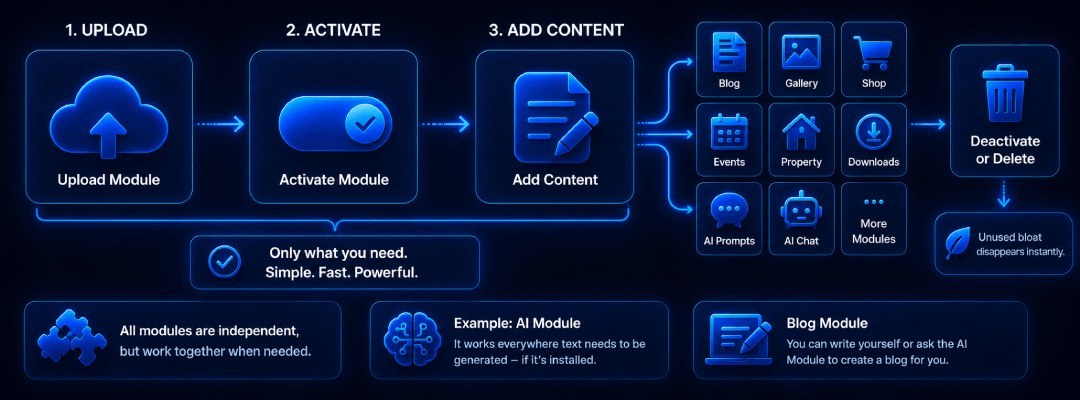
- Upload: Every module is its own ZIP file. You upload it in the backend.
- Activate: One click, and the module appears in the backend with its own menu item.
- Place: You decide where the module shows up on your site, for example on the homepage, inside an article or on its own subpage.
No programming skills needed and no configuration files to touch.
Example Modules
- Database: Small projects run without any database at all. When your project grows, you simply add one as a module, without rebuilding anything.
- Gallery: Image galleries in several variants, from pure CSS to lightbox
- Blog: Articles with categories, catalog pages and automatic schema markup for Google
- Social Media: Write a post once and publish it on several platforms
- Newsletter and Donations: Small widgets that fit into any page
Other modules, such as a portfolio or an event calendar, follow the same principle.
Maintain Content Once, Use It Everywhere
Modules follow the Cell principle: content is made of small building blocks. A gallery can appear on several pages, an entry on the homepage and in an overview at the same time. You change it in one place, and the next time the pages are generated, it is up to date everywhere.
Removing Modules
If you no longer need a module, you deactivate and remove it. The core stays untouched and nothing is left behind. That keeps updates simple and the system stable.
For Developers
Modules work independently of the core. New features can be built without changing the base system. A custom module is essentially a folder with a clear structure, packed as a ZIP file.
👉 Why PlaCeMS is built this way in the first place: [Modular Instead of Overloaded].