
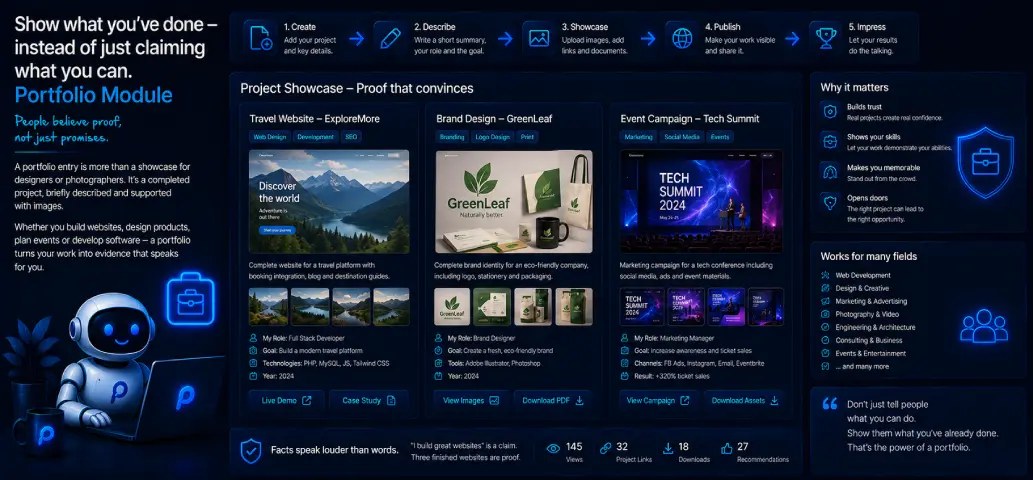
Show what you've done—instead of just claiming what you can do.
"Portfolio" quickly brings to mind a graphic designer or photographer presenting their work. But at its core, a portfolio entry is something far more universal: a completed project, briefly described, backed up with images. And that exact principle applies to a lot more professions and projects than you might think at first.
The reason this works is simple: people rarely believe claims right away, but they do believe proof. "I build good websites" is a claim. Three finished, working websites with a screenshot and a link are proof. That's exactly the difference a well-maintained portfolio makes—no matter the industry.
Where the Portfolio Module Can Be Used
A few examples that go beyond the classic creative portfolio:
- Web developers and agencies — finished client projects with a screenshot and a link to the live site, just like in the example above with PlaCeMS itself, Genessa Homes, and RHPS-Berlin.
- Tradespeople and contractors — completed renovations, remodels, or custom furniture, with before-and-after photos as the most convincing sales argument there is.
- Architects and interior designers — realized building projects, sorted by year or category.
- Event planners and caterers — past weddings, corporate events, or parties, with images that say more than any description could.
- Consultants and agencies — case studies instead of plain reference lists: what was the challenge, what came out of it?
- Artists and musicians — completed bodies of work, albums, or past performances.
- Nonprofits and community projects — completed initiatives, documented transparently for members and supporters.
The common thread: this isn't about ongoing offerings like in a shop—it's about proof, finished work that speaks for itself. That's exactly why the Portfolio Module often fits better with "I've already done this" than the Shop, which is more built for "you can buy this from me."
What Every Entry Includes
For each project, you enter a title, a description—in German and English side by side, as everywhere in PlaCeMS—up to six photos via drag and drop, and an optional link, for example to the live website or an external reference. You decide the display order yourself, so your best or most recent project always shows up first.
You can also set custom SEO for each individual entry—page title and meta description, separately for German and English. If you leave the fields empty, PlaCeMS automatically generates sensible values from the title and text, so you don't have to fill these in by hand for every single project—though this does require the AI Prompts Module, which generates these texts in the background. If it isn't installed, you simply enter the title and description by hand as usual.
An Overview That Speaks for Itself
On the public portfolio page, all projects appear neatly stacked, with a freely editable intro text above them—also bilingual. Each project shows its cover image, a short text preview, and the number of photos attached, before visitors dive in deeper.
Whether a project should be publicly visible or not is your choice, entry by entry—handy for a client project that may only be shown once it officially launches.
Only If You Need It
Like every PlaCeMS module, the Portfolio Module is completely optional. If you don't have any completed projects to show, it simply stays unused in the background.
Whether it's a website, a renovation, a wedding, or a work of art—if it's a completed project that should speak for itself, the Portfolio Module is the right place for it.