Content, images, settings, modules—and countless hours of work.
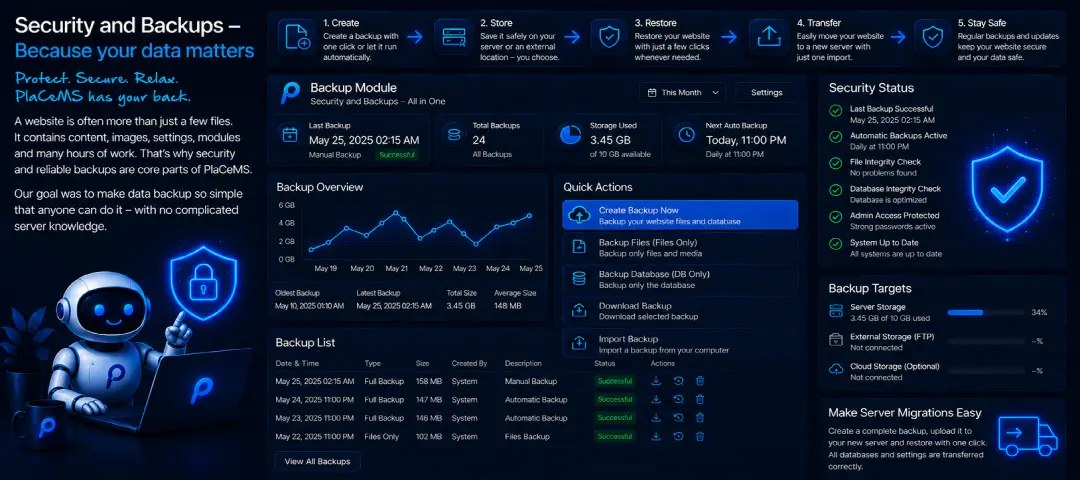
A website is often more than just a handful of files. It holds content, images, settings, modules, and countless hours of work—things that can't simply be recreated once they're gone. That's exactly why security and reliable backups are among the most important parts of PlaCeMS. Our goal was to make backups so simple that anyone can use them—without needing advanced server knowledge.
A Backup in One Click – Truly Everything
With PlaCeMS, you can create a complete backup of your website at any time. All the important data gets packaged into a single ZIP file, including:
- Pages and content
- Images and media
- Modules and settings
- the entire database
- Templates
- Configuration (excluding sensitive credentials)
The database isn't just backed up on the surface—it's included as a full, standalone database dump packed right into the same ZIP file, with no extra tools like phpMyAdmin or shell access to the server required. One backup, one click, everything included.
Store It Locally or Directly on the Server
You decide where your backups are stored. PlaCeMS supports both local backups on your own computer and server-side backups—and works seamlessly with keeping multiple backups around, so you can fall back on an older version whenever you need to.
Restore – Exactly What You Actually Need
Restoring is just as simple as creating a backup: select the backup, upload it, and let it run—PlaCeMS handles the rest. Within minutes, your website is back exactly the way it was when the backup was made, with no complicated database imports or manual file copying.
You don't always have to restore everything, either: you can specifically choose whether to restore just the files, just the database, or both together. Handy if, say, only a single faulty database entry needs correcting, without overwriting recent image uploads or settings that have been added since the backup was made.
And in case something does go wrong during a restore: PlaCeMS automatically creates a safety backup of your current state before every restore—including the current database, if that's about to be overwritten. If the restore doesn't turn out the way you wanted, you can always get back to exactly where you were right before.
Perfect for Server Migration
Moving to a new server is just as easy: create a backup on the old server, transfer the ZIP file to the new one, extract it into the web directory—done. PlaCeMS detects the existing installation and automatically restores all content, modules, templates, settings, and the entire database. The whole migration usually takes just a few minutes, with no separate database export through a third tool required.
Security Comes First
For security reasons, particularly sensitive information is never included automatically—things like API keys, credentials for external services, SMTP passwords, database passwords, individual security keys, and secret tokens. These values need to be re-entered in the configuration once, after a restore or a server move.
That's a deliberate design choice: if a backup ever ends up in the wrong hands, it won't contain any confidential credentials that could be used to access external services or accounts.
Automatic Backups
If you prefer, you can turn on automatic backups. PlaCeMS then creates new backups on its own at intervals you define, saving them wherever you want—database included. That quietly builds up a reliable safety net without you having to think about it every time.
Reliable Protection Without Complexity
A good backup is only worth something if it can be restored quickly and completely when it actually matters. That's why PlaCeMS follows one simple principle: create a backup, save the ZIP file, restore exactly what's needed whenever you need it—done. No complicated tools, no hours-long recovery processes, no unnecessary risk.
Your website is precious—whether it's a server move, a mistake after an update, or simply a reassuring safety net running quietly in the background: the Backup Module keeps it protected, complete with everything that belongs to it.