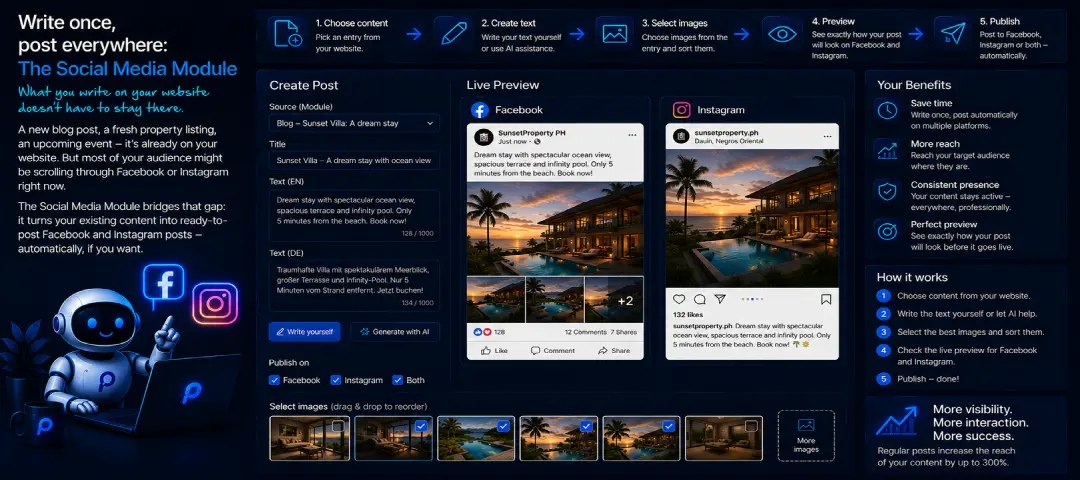
What you write on your website doesn’t have to stay there.
A new blog post, a fresh property listing, an upcoming event – it’s all already on your website. But a large part of your audience is probably scrolling through Facebook or Instagram right now, not your site. The Social Media Module closes exactly that gap: it turns content you’ve already written into ready-to-publish Facebook and Instagram posts – automatically, if you want it to.
See it live before anything goes out
Before a post is published, a live preview shows you exactly how it will look on Facebook or Instagram – with your profile picture, name, text and the selected photos, just as it will really appear. No guesswork, no surprises after you hit publish.
You pick the photos straight from the images of the entry itself – a property listing or a blog post, for example. Click to select or deselect, and arrange them in the order you want.
Your words, your style – by hand or with AI
You can edit the post text right in the built-in editor, complete with an emoji picker and a character counter, so your post actually reads like a social media post and not like website copy pasted 1:1.
Don’t feel like doing the fine-tuning yourself? Let the AI Prompts Module take over. There you set your own system prompt – for example “Write like a professional social media copywriter for an international audience” – plus a template with placeholders such as price, number of rooms, description or hashtags, which are filled in automatically with the real values of each entry. Every generated post stays in your style, without you having to start from scratch each time.
Post now or schedule for later
Publish a post right away, or schedule it for a specific date and time – handy for sending posts out when your audience is actually online, without having to sit at your computer at that exact moment. Facebook and Instagram can be switched on or off independently, in case a post should only appear on one of them.
The queue keeps track of everything
All scheduled and processed posts end up in the Post Queue dashboard. At a glance you see how many posts are still waiting, how many were published successfully, and whether anything failed. One click on “Start worker now” processes the queue immediately instead of waiting for the next automatic run.
If a post ever fails – say, because no image was attached – the system automatically retries up to three times before giving up. A detailed log shows exactly what happened with every job: which platform, which entry, how many attempts, and in case of an error, the exact error message. So you never have to wonder whether a post really made it.
Only if you need it
Like every PlaCeMS module, the Social Media Module is completely optional. If you don’t want to share your content on Facebook or Instagram automatically, it simply stays unused – your website keeps running completely independently.
Write an article, publish a listing – and with just a few clicks, it’s also visible where your audience already spends its time.