

If visitors can't find their way, they leave.
Even the best website is of little use if visitors can't find what they are looking for. A confusing or overloaded navigation quietly but reliably costs you visitors – not because the content is bad, but because the way to it was too complicated.
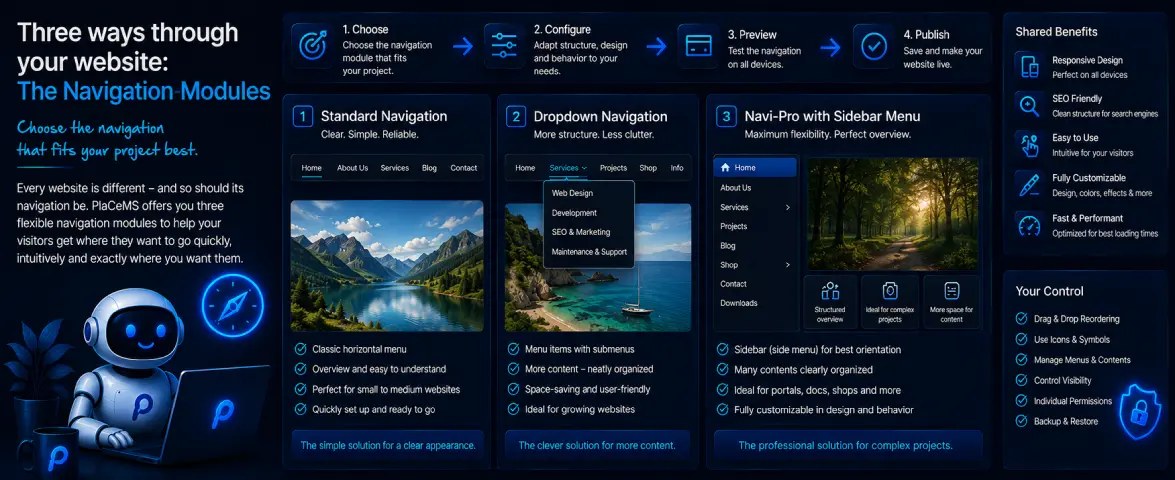
That is exactly why PlaCeMS has not just one but three different navigation modules. Technically they exclude each other – only one variant can be active at a time – but you can switch between them whenever you like without losing anything. Your settings for each variant are kept, even while you are using a different one.
Nav: Standard – lean and straightforward
Nav: Standard is the most minimal of the three: a fixed top navigation with a clear list of links, plus matching CSS for alignment, colours and hover effects. No side menu, no footer menu, no members' area – just the navigation itself, with nothing around it.
That makes it the right choice for anyone who knows exactly what they need: a simple, fixed list of links at the top of the page, cleanly styled, without extra features that never end up being used. A small business website, a personal portfolio, a simple one-page site – in most cases, Nav: Standard is all you need.
Navigation – the complete solution
The full Navigation module is its counterpart: the complete package with top navigation, side navigation, footer menu, a dedicated members' area for logged-in users – and a visual hotspot editor where you click directly on a preview of your real page to decide which area gets which menu.
This variant pays off as soon as a project grows: several levels of content, an area only for logged-in members, a sidebar for additional navigation next to the main text. If your project's requirements grow, you will find everything you need here instead of having to cobble it together later.
Nav: Dropdown – the classic, for good reason
Functionally, Nav: Dropdown sits between the other two: a top navigation where submenus fold out under individual menu items. It's a pattern practically everyone knows from the web – and that is exactly its strength.
As soon as a website has several related subpages – such as “Services” with several individual offers below it, or “Products” with different categories – a dropdown menu helps make this structure visible without overloading the main navigation with ten separate links. No side menu, no members' area, but exactly the one extra feature many projects actually need: sensibly grouped sub-items.
Which one is right for you?
A quick guide:
- A simple, fixed list of links with no extras? → Nav: Standard
- A multi-level website with a members' area and a sidebar? → Navigation
- Several related subpages that can be grouped sensibly? → Nav: Dropdown
And if you are unsure: just try it out. Switching between the three variants doesn't cost you any settings you have already entered – you can always go back if another variant turns out to fit better.
Three navigation modules, one shared goal: visitors should find what they are looking for – however simple or extensive your project is.