
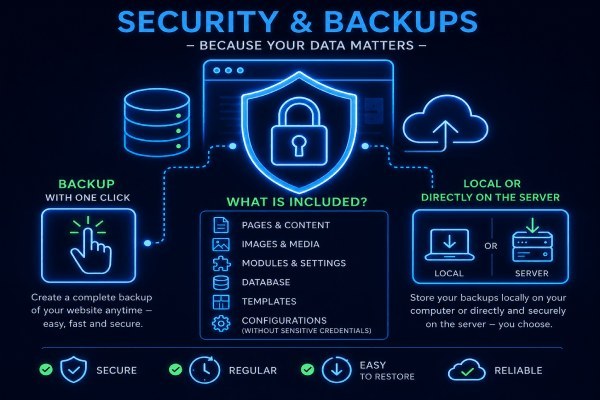
Security & Backups – Because Your Data Matters
A website is much more than a collection of files. It contains your content, images, settings, modules, and countless hours of work. That's why reliable backups and strong security are built into the core of PlaCeMS.
Our goal was simple: make backups so easy that anyone can use them—without needing advanced server knowledge.
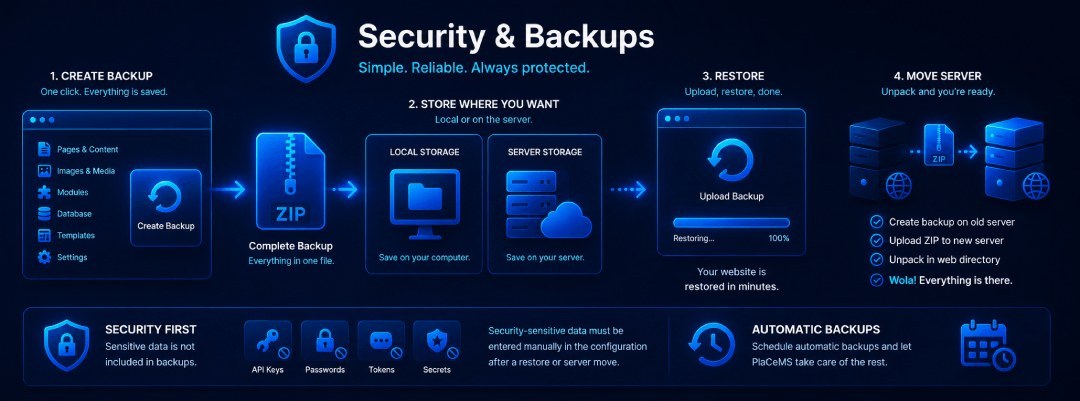
Backup with a Single Click
 With PlaCeMS, you can create a complete backup of your website at any time.
Everything is packaged into a single ZIP archive, including:
- Pages and content
- Images and media files
- Installed modules
- Templates
- Database
- System settings
- Configuration files (excluding sensitive credentials)
This gives you a complete snapshot of your website whenever you need it.
Store Backups Wherever You Want
You decide where your backups are stored.
PlaCeMS supports both local backups on your computer and server-side backups. You can choose the strategy that best fits your workflow and even keep multiple backup versions for added peace of mind.
Restore in Just Minutes
Restoring a backup is just as simple as creating one.
Select the backup file, upload it, and let PlaCeMS handle the rest.
Within minutes, your website is restored exactly as it was when the backup was created.
No complicated database imports.
No manual file copying.
No technical headaches.
Perfect for Server Migration
Moving your website to a new server is just as easy.
Create a backup on your current server.
Upload the ZIP file to your new server.
Extract it into your web directory.
That's it.
PlaCeMS automatically detects the installation and restores your website, including content, modules, templates, and settings.
In most cases, the entire migration takes only a few minutes.
Security Comes First
For security reasons, sensitive information is never included in backups.
This includes items such as:
- API keys
- SMTP passwords
- Database passwords
- Third-party service credentials
- Secret tokens
- Security keys
After restoring a backup or moving to a new server, these values simply need to be entered again in the configuration.
This is an intentional security feature.
Even if someone gains access to one of your backup files, they won't obtain the credentials needed to access your external services or accounts.
Automatic Backups
If you prefer, PlaCeMS can create backups automatically.
Simply define how often backups should run and where they should be stored. The system takes care of the rest, ensuring that your latest data is always protected without any manual work.
Reliable Protection Without Complexity
A backup is only useful if it can be restored quickly and reliably.
That's why PlaCeMS follows one simple philosophy:
Create a backup. Save the ZIP file. Restore it whenever you need it.
No complicated tools.
No lengthy recovery procedures.
No unnecessary risks.
Just a secure, reliable backup system that protects your website—whether you're recovering from an update, moving to a new server, or simply making sure your hard work is always safe.