Installation
PlaCeMS was built with one clear goal: installation should be done in just a few minutes, without complicated wizards, without unnecessary configuration, and without excess baggage.
System Requirements
PlaCeMS runs on almost any modern web server with PHP.
Minimum requirements
- PHP 8.3 or newer
- Apache or Nginx
- cURL
- GD
- PHP-FPM (recommended)
- Write access to the PlaCeMS directory
Database (optional)
A database is not required to run PlaCeMS. The core system stores its data in JSON files and works fully without a database. This keeps installation especially simple and makes it a great fit for small and medium-sized websites.
From a certain project size onward, though, installing the Database module is worth it. It offers clear advantages in performance and management, especially with larger amounts of data.
Typical use cases include:
- large blog systems (roughly more than 50 posts)
- large galleries with many images
- member areas
- user management
- extensive search functionality
- future extensions with large amounts of data
Since the Database module is fully integrated into PlaCeMS, you can switch from JSON storage to a database solution at any time, without having to reinstall the entire system.
File Permissions
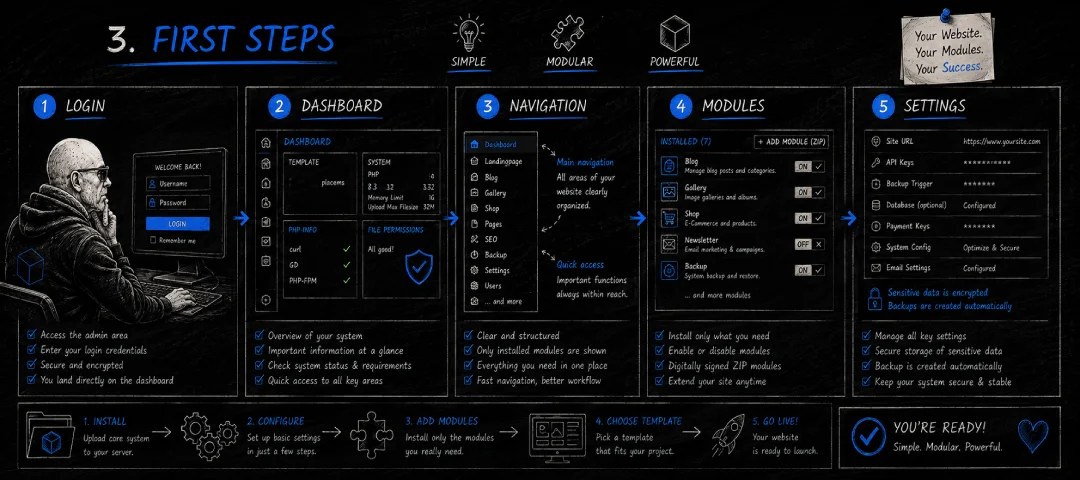
During installation, PlaCeMS automatically checks all required file and folder permissions. Where possible, missing permissions are corrected automatically. If that's not possible on the server side, PlaCeMS clearly lists the affected directories and tells you which settings should be adjusted.
Once the check is complete, the system confirms the status of all files and folders.
Installation in Three Steps
Setting up PlaCeMS is deliberately simple.
1. Upload the core system
Upload the PlaCeMS core system to your web server, then open the admin interface (dashboard).
2. Configure the basics
Set up your website with just a few details, for example:
- Website name
- Language
- Administrator
- Storage option (JSON or Database module)
PlaCeMS then automatically checks the server environment and file permissions.
3. Install modules
Install only the features you actually need. Every module ships as a digitally signed ZIP package and can be installed directly through the Module Manager.
Finally, pick a template, and your website is ready to go.
The PlaCeMS Principle
Unlike many other CMS platforms, PlaCeMS doesn't install countless features right from the start. You decide which modules your project actually needs. That keeps the system:
- fast
- clear
- secure
- easy to maintain
- extensible at any time
Install the core system, configure it, choose your modules, activate a template, done.
No unnecessary baggage. That's PlaCeMS. Simple. Modular. Powerful.